This article contains affiliate advertising (PR).

USB-C Hub Comparison: Anker 332 (Hands-On) vs 341 vs 555 vs UGREEN Revodok
If your laptop only has USB-C and you need a monitor, a USB stick, or wired LAN, a USB-C hub is worth owning. But “5-in-1” versus “8-in-1” makes it hard to tell how much you actually need. The short answer: HDMI plus USB-A only → a 5-in-1 (Anker 332); wired LAN or SD as well → a 7- or 8-in-1 (Anker 341 / 555); 4K60Hz output plus LAN → UGREEN Revodok 6-in-1. This guide uses the Anker 332 the owner actually uses as the baseline and compares the step-ups on four axes. For the basics, see choosing a USB-C hub.
The short answer: picks by use
- HDMI plus USB-A is enough (minimal): Anker 332 USB-C Hub (5-in-1)—owner uses this. AmazonRakuten
- Wired LAN and SD too: Anker 341 USB-C Hub (7-in-1)—the middle model that adds LAN and SD. AmazonRakuten
- 4K60Hz plus LAN plus 100W power: UGREEN Revodok 6-in-1—for a high-refresh external monitor. AmazonRakuten
Main differences: HDMI resolution (4K30Hz vs 60Hz), wired LAN or not, SD or not, pass-through power ceiling.
Verification: the Anker 332 is owner-used (hands-on); the others are compared from public (stated) specs.
The short answer: four axes settle it
| Axis | What to look at | Call |
|---|---|---|
| HDMI | 4K30Hz or 4K60Hz | 30Hz is fine for meeting-room monitors and projectors; go 60Hz for gaming or high-refresh displays |
| Wired LAN | Port or not (1Gbps) | Useful for office or hotel Ethernet and flaky Wi-Fi |
| SD / microSD | Slot or not | For importing from cameras and dashcams |
| Pass-through power | Often 100W in → ~85W out | Check the ceiling if you charge the laptop through the hub |
“Everything-in-one” means bigger, heavier, pricier. Buy only the ports you use.
● Owner uses this
The owner uses the Anker 332 hub with a MacBook. Since the MacBook only has USB-C, it's especially handy at client sites where the monitor cable is HDMI-only: plug USB-C into the MacBook and run HDMI from the hub to the monitor, and you're never stuck for display output on the go. It also connects USB (Type-A) devices like a USB drive—adding the ports you need from one connection is genuinely useful on a thin MacBook. Wired LAN and SD cards aren't part of the owner's routine, so the 5-in-1 covers it.
Comparison table
| Product | HDMI (rated) | Wired LAN | SD | USB-A | Pass-through (rated) | Best for | Main weakness |
|---|---|---|---|---|---|---|---|
| Anker 332 (5-in-1) | 4K@30Hz | No | No | ×2 (5Gbps) | 100W in (~85W out) | HDMI + USB-A minimal setup | No LAN or SD |
| Anker 341 (7-in-1) | 4K@30Hz | 1Gbps | SD | ×2 (5Gbps) | 100W in (~85W out) | Adding LAN and SD | No 4K60Hz |
| Anker 555 (8-in-1) | 4K@60Hz | 1Gbps | SD / microSD | ×2 | 100W in (~85W out) | Everything, plus 10Gbps USB-C | Larger; higher tier |
| UGREEN Revodok 6-in-1 | 4K@60Hz | 1Gbps | No | ×1 (USB 3.2) | 100W PD | 4K60Hz + LAN, compact | No SD |
HDMI, power, and ports are makers’ official / product-page ratings. Pass-through output is usually the input minus the hub’s own draw—check the ceiling on the product page.
Each product: who it suits, and its weakness
Anker 332 USB-C Hub (5-in-1)—hands-on
HDMI (4K30Hz), USB-A ×2, USB-C data, USB-C power. If your use is “connect a monitor, plug in a USB stick,” it’s exactly enough. The owner’s client-site use is described above. Without LAN or SD needs, it’s the most compact and affordable choice.

Anker 332 USB-C Hub (5-in-1, 100W PD, 4K HDMI)
Anker 341 USB-C Hub (7-in-1)
The 332 plus wired LAN (1Gbps) and an SD slot; HDMI stays 4K30Hz. The “just right” model for office Ethernet or camera imports.
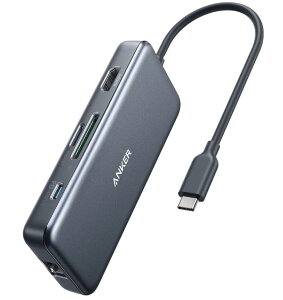
Anker 341 USB-C Hub (7-in-1, HDMI, LAN, SD)
Anker 555 USB-C Hub (8-in-1)
HDMI 4K60Hz, 10Gbps USB-C, LAN, SD / microSD—everything. For a permanent desk setup that uses an external monitor fully. Larger, and a higher tier.
UGREEN Revodok 6-in-1 (4K60Hz, LAN, 100W PD)
No SD, but 4K60Hz plus LAN plus 100W PD in a compact body. For “I need a high-refresh monitor and Ethernet, not cards.”

UGREEN Revodok USB-C Hub (6-in-1, 4K60Hz HDMI, LAN, 100W PD)
Common mistakes
- Overlooking 60Hz: 4K30Hz is fine for office work; fast motion and gaming monitors show the difference.
- Pass-through ceiling: many output ~85W from a 100W input. Charge a 16-inch laptop directly instead (100W charger comparison).
- iPad and phone use: some hubs are PC-only (the product page may say “not for smartphones or iPad”).
- Cable length: hub cables are often short—plan the desk layout (a tidy desk charging setup).
FAQ
Q. Is charging a MacBook through the hub slow? A. Output is the input minus the hub’s draw (often ~85W class), so large laptops may charge slower than direct. 13–14-inch machines are usually fine in practice.
Q. How is a Thunderbolt / USB4 dock different? A. Docks have far more bandwidth (40Gbps) for dual monitors and fast storage, but are bigger and pricier. The hubs here are “the portable minimum.”
Sources (primary)
- Anker official: “Anker 332 USB-C Hub (5-in-1)” / “Anker 341 (PowerExpand+ 7-in-1)” / “Anker 555 (PowerExpand 8-in-1)”
- UGREEN Revodok 6-in-1: product-page figures
- Basics: choosing a USB-C hub / USB-C explained
Summary
- HDMI plus USB-A only → 5-in-1 (Anker 332)—enough for the owner’s use.
- LAN or SD → 7- or 8-in-1 (Anker 341 / 555); 4K60Hz plus LAN, compact → UGREEN Revodok.
- Pass-through is often ~85W class; charge big laptops directly.
Related: a tidy desk charging setup / charging a laptop over USB-C
This article compares products based on public specifications and trends in customer reviews (not hands-on testing by our team). Prices, availability, and review counts change, so please check each product page for the latest. About us: About
As an Amazon Associate, Tokyo Gadget earns from qualifying purchases. This site also participates in other affiliate programs.